

GMKtec NucBox K13 Mini AI Host | Optimized for OpenClaw, Lightweight 24/7 AI Employee

The open-source AI agent OpenClaw has taken the tech world by storm. Unlike conventional AI tools that require manual activation, OpenClaw operates 7×24 hours autonomously, proactively executing tasks and orchestrating tools to supercharge your daily workflow—an ideal "round-the-clock AI employee."
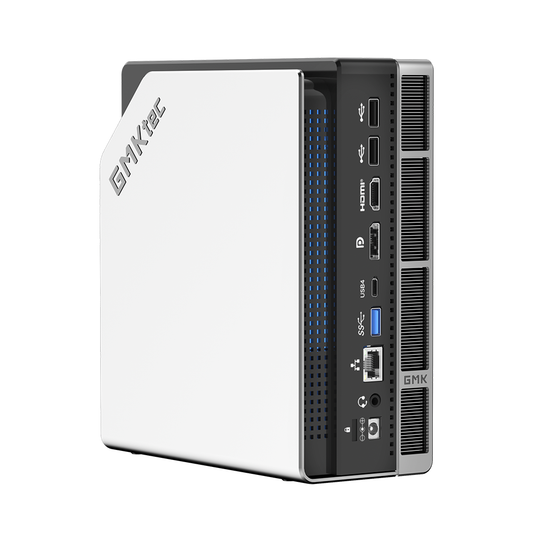
This demands hardware that balances robust computing power, stable operation, and flexible adaptability. It must not only support long-term AI uptime but also accommodate diverse deployment needs, both in the cloud and on-premises. The GMKtec NucBox K13 Mini AI Host fits this requirement perfectly. Packing formidable performance into a compact 0.6L chassis, it serves as a lightweight solution to unlock the full potential of OpenClaw, striking an optimal balance between cost-efficiency and practicality.
The GMKtec NucBox K13 is the ideal lightweight partner for deploying OpenClaw. Its core advantages precisely match the operational requirements of AI agents, making the implementation of OpenClaw effortless:
Robust AI Architecture: Low Latency, Zero Lag
Powered by the Intel Core Ultra 7 256V processor (Lunar Lake platform) built on TSMC’s advanced 3nm process, it features an 8-core/8-thread design with a boost frequency of up to 4.8GHz. Integrated with a high-performance Intel Arc 140V GPU and a dedicated NPU, this tri-core synergy delivers a staggering 115 TOPS of local AI computing power. With AI Benchmark scores approaching 15,000 and Master Lu benchmark scores exceeding 1.2 million, the system provides ample power for OpenClaw’s complex task execution, significantly boosting response times and eliminating lag during long-term operation.
High-Speed Memory & Flexible Expansion: Meeting Massive Data Needs
Equipped with 16GB of LPDDR5X-8533MT/s high-frequency quad-channel memory as standard, the unified memory architecture allows the CPU, GPU, and NPU to flexibly allocate larger VRAM capacity, satisfying OpenClaw’s demands for massive data caching. It features dual PCIe 4.0 M.2 slots, supporting SSD expansion up to 16TB with a quick-release design. This easily accommodates OpenClaw’s toolchains, model files, and task data for long-term deployment.
High-Speed Connectivity: Seamless Cloud Collaboration
Dual full-featured USB4 ports offer 40Gbps bandwidth. Combined with WiFi 6E (2.4Gbps, 3x faster than WiFi 5) and a 5Gbps Ethernet card, it creates a high-speed interconnection channel. This ensures delay-free multi-device collaboration and cloud model synchronization, perfectly matching OpenClaw’s cloud-deployment needs. Additionally, an HDMI 2.1 interface supports triple 4K display output, expanding workspace for developers to monitor OpenClaw’s status.
Silent & Enduring Operation: Compact Design
Utilizing a vapour-chamber copper turbine fan architecture, the full-load operating noise is kept below 40dB. Despite its compact size (0.6L volume, 523g weight—1/40th the size of a traditional desktop), it maintains cool and silent operation even under 24/7 heavy loads. It supports three power modes (Peak Performance, Balanced, and Silent) to suit different OpenClaw workloads.
Hassle-Free Deployment: Lowering the Barrier to Entry
Perfectly compatible with Linux and Windows 11 Pro systems supported by OpenClaw, developers can deploy toolchains directly without complex debugging, significantly lowering the barrier for cloud and local maintenance. It is among the first to successfully run Clawdbot (an OpenClaw derivative tool) and provides easy-to-follow tutorials for beginners.
High Value & Reliability: Peace of Mind for Long-Term Use
Starting at $699.99, available in 16GB+512GB and 16GB+1TB configurations, it delivers formidable AI power at a fraction of the cost of traditional AI workstations. Backed by GMKtec’s mature quality control and comprehensive after-sales support, it is designed for a long service life of 5-7 years, safeguarding OpenClaw’s long-term deployment across various scenarios.
Let’s Wake It Up: Deploy OpenClaw on Your K13
Ready?
Follow the steps below to deploy OpenClaw on your quiet yet powerful K13 and begin your intelligent creation journey.
Step-by-Step OpenClaw Deployment Guide
I. Environment Setup
1. Disable the Firewall
● Open Control Panel
● Go to System and Security → Firewall → Advanced Settings

II. Download Required Components
1. Install WSL2 + Ubuntu
Scenario 1: Wired Network Connected
● Insert an Ethernet cable
● Run Windows PowerShell as Administrator
● Enter: wsl --install
● Wait until progress reaches 100%
● Ubuntu will install automatically

Scenario 2: Restart Required

● Restart the system
● Run Windows PowerShell as Administrator
● Enter: wsl --list --online wsl --install -d Ubuntu-24.04
● Wait for installation
● Create a username and password
● Restart once completed

2. Update Ubuntu Environment
● Open Ubuntu
sudo apt update && sudo apt upgrade -y
● Enter your password and wait for completion

3. Install Node.js 22 and Dependencies
curl -fsSL https://deb.nodesource.com/setup_22.x | sudo -E bash - sudo apt-get install -y nodejs

4. Verify Versions
● Run in Windows PowerShell (Administrator):
wsl -l -v wsl lsb_release -a
● Confirm WSL2 and Ubuntu 24.04 are in use

III. Install OpenClaw
(also known as “Big Lobster” or “Jarvis”)
1. Installation
● Open Ubuntu
curl -fsSL https://clawd.bot/install.sh | bash
● Confirm prompts:
○ yes
○ QuickStart
○ Qwen
○ Qwen OAuth
● Copy the authentication link, log in via browser
● Select Keep current (qwen-portal / coder-model)


2. Social Platform Configuration
● Choose:
○ Skip for now
○ No
● Press Space to select:
○ boot-md
○ command-logger
○ session-memory
● Press Enter to confirm
● Select Hatch in TUI
● Press Ctrl + C to pause OpenClaw

3. Fix Gateway Authorization Issues
clawdbot dashboard
● Copy the link and authorize in your browser
● Restart gateway:
clawdbot gateway restart

IV. Verify Successful Operation
1. Testing
● Open Ubuntu
● In your browser, visit:
http://127.0.0.1:18789/
● If the top-right corner shows Health: OK, Clawdbot is running successfully
● You can now start asking questions or issuing commands

Notes: Integration with Collaboration Platforms
If you plan to integrate OpenClaw with Feishu or other collaboration tools, prepare the following:
1. MiniMax or OpenAI API Key
2. Brave API Key
3. Accounts for the relevant collaboration platforms
The GMKtec NucBox K13 is more than just a compact and powerful mini AI host; it is a lightweight, reliable vessel for deploying OpenClaw, and a cost-effective partner to kickstart your AI lifestyle. By packing formidable performance into a compact chassis, it precisely meets every demand of AI agents with solid hardware prowess. The K13 transforms OpenClaw from a mere "tool" into a true "24/7 AI employee," serving as a lightweight hardware catalyst for AI adoption. Balancing practicality, cost-efficiency, and flexibility, it empowers industries across the board to easily embrace the AI productivity revolution.