

Can Intel iGPU Run a 120B LLM? Real-World Performance Test
Introduction: Why This Matters
Hello everyone, this is Dalu.
On November 20, 2025, Intel showcased a series of live demos at its Technology Innovation & Industry Ecosystem Conference, demonstrating thin-and-light laptops and mini PCs running 120B large language models using only Intel integrated graphics.
I was there in person—and honestly, the information density of this session was explosive.

What Intel revealed wasn’t just a demo. It was a clear signal:
Any device powered by Intel can now run AI.
This applies not only to laptops and mini PCs, but also to edge devices such as NAS systems. I’ve personally tested and shared experiences with an AI Home NAS, where Intel iGPU-based AI workloads—once unimaginable—are now fully practical.

From “Impossible” to Everyday Productivity
With Intel® Core™ Ultra AI processors, tasks like:
-
Audio transcription with timeline visualization
-
Intelligent summarization of meeting recordings
-
Content indexing across audio, images, and video
are no longer limited to cloud servers or discrete GPUs.

Previously, Windows search was limited to filenames or basic document text. Today, AI-powered systems can:
-
Recognize text inside images
-
Understand image content
-
Summarize the video and audio
-
Perform multilingual voice cloning with just seconds of audio
Yes—this is already a nightmare for traditional voice actors.

Why I Personally Use Voice Cloning
In my own content creation workflow:
-
I record freely (often too freely—videos get long)
-
AI generates a subtitle timeline
-
I refine structure and pacing
-
AI recreates my voice using TTS + voice cloning
-
Final output is shorter, clearer, and more professional
Without AI, long-form videos struggle to gain traction. With AI, reach and engagement improve dramatically.
AI doesn’t just increase productivity—it changes how we work.

The Real Challenge: Making AI Practical
For many people, AI feels both familiar and distant.
You’ve seen it everywhere:
-
Short-video narration
-
Face swaps
-
Voice cloning memes
But many still believe AI is too complex or inaccessible.
That perception is outdated.
-
2023 was the Year of AI (commercial adoption)
-
2025 is the Year of AI Applications (consumer-level adoption)
With Intel Core Ultra integrated graphics, the barrier to entry has dropped dramatically. AI is no longer elite—it’s usable.
How Can Integrated Graphics Run Large Models?
Let’s clarify performance fundamentals:
Compute hierarchy (approx.):
Discrete GPU > iGPU ≈ NPU > CPU
Historically, iGPUs could only handle up to 14B parameter models, limited by:
-
Shared memory constraints
-
Inference speed falling below usable thresholds (<10 tokens/s)

Breakthrough #1: Expanded Shared Memory
Intel’s recent driver updates allow dynamic shared memory allocation.
For example:
-
With 96GB RAM, up to 90.7GB can be allocated to iGPU/NPU
-
Memory is non-exclusive, dynamically shared with the OS
Unlike unified memory systems, where allocation is locked, Intel’s approach is flexible—and far more cost-efficient.

Breakthrough #2: Model Optimization
AI models have evolved rapidly:
-
Dense → Distilled → Quantized → Sparse (MoE) models
A key example: Qwen A3B (Active 3B)
-
Total parameters: ~30B
-
Active parameters per token: ~3B
-
Architecture: Mixture of Experts (MoE)
Result:
-
Larger knowledge base
-
Faster inference
-
Practical on iGPU
For all tests below, inference speed stays above 10 tokens/s, which is the accepted minimum for fluent interaction.

Test Scope
Beyond LLMs, this test also covers:
-
Text-to-image generation (Z-Image)
-
OCR
-
Text-to-speech (TTS)
Text-to-video is still beyond iGPU capabilities—for now.

Test Platform
-
Processor: Intel® Core™ Ultra 9 285H
-
Memory: 96GB (48GB ×2)
-
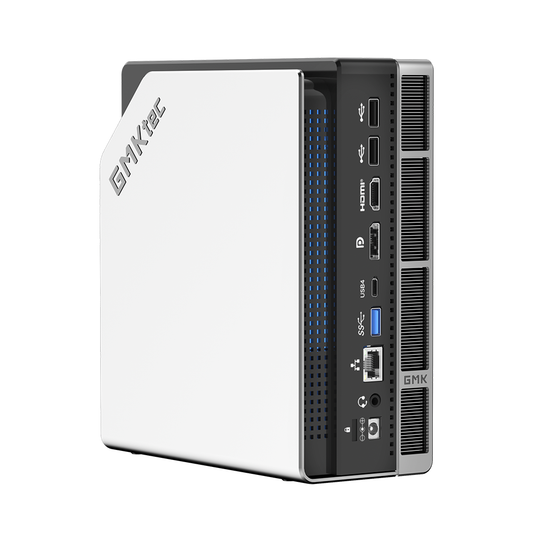
Device: GMKtec EVO-T1 Mini PC
Why this system?
-
Excellent price-to-performance ratio
-
Triple PCIe 4.0 NVMe slots
-
Thunderbolt 4 + OCuLink support
-
Advanced cooling (VC vapor chamber + dual fans)
-
Built-in AI assistant with model store
This setup allows both local AI workloads and external GPU expansion.
LLM Performance: From 20B to 120B
20B GPT-OSS (Q4)
-
Output: ~2,380 tokens
-
Speed: ~17 tokens/s
-
Markdown & table support fully usable
120B GPT-OSS (Q4)
-
iGPU memory usage: high but stable
-
Speed: ~11 tokens/s sustained
-
No significant slowdown even after long outputs
This alone would have sounded absurd just a year ago.
Sparse Models: 30B to 80B
Using Qwen A3B models via tools like Flowy AI Assistant and Intel’s XPU runtime:
-
30B A3B Q4: ~15 tokens/s
-
80B A3B Q4: ~11+ tokens/s
Even complex tasks like:
-
PDF analysis
-
Mind map generation
-
Creative writing
run smoothly on iGPU.
Text-to-Image: Z-Image-TurBo on iGPU
Z-Image-TurBo:
-
~6B parameters
-
Excellent text understanding
-
Strong Chinese text rendering
With OpenVINO™ acceleration:
| Resolution | Time |
|---|---|
| 1024×1024 | ~70s |
| 1024×768 | ~52s |
| 600×900 | ~35s |
Compared to RTX 3060 benchmarks, this is remarkably competitive—especially given the power consumption difference.
OCR: Finally Accurate
Modern AI-based OCR dramatically improves accuracy over legacy methods.
Using DeepSeek OCR:
-
Low memory usage
-
Markdown/Text output
-
High accuracy even with mixed font sizes
Not perfect—but each 1% gain in accuracy saves enormous time.
TTS & Voice Cloning
Using fireredTTS2:
-
Multi-speaker dialogue supported
-
<5s audio samples required
-
36s output generated in ~100s
Compared to my RTX 5090D system:
-
GPU power draw: 400W+
-
iGPU power draw: ~20W
-
Performance gap: <3×
Efficiency wins.
Summary: Turning the Impossible into Reality
Measured Results
-
20B OSS Q4: ~17 tokens/s
-
30B A3B Q4: ~15 tokens/s
-
80B A3B Q4: ~11+ tokens/s
-
120B OSS Q4: ~11+ tokens/s
-
Z-Image 1024²: ~70s
-
TTS output ratio: ~1:2.8
Intel Core Ultra integrated graphics have crossed a threshold:
-
AI is usable
-
AI is efficient
-
AI is affordable
What was once impossible is now practical—and surprisingly good.
Final Thoughts
If you already own a Core Ultra 200H laptop or mini PC, start experimenting with AI now.
If you’re upgrading, Core Ultra is absolutely worth considering.
AI is no longer the future.
It’s already here—and it runs on integrated graphics.
Thank you for reading.
Wishing you success, prosperity, and a great year ahead 🚀
Source:
https://zhuanlan.zhihu.com/p/1983964097180620690?share_code=rDDs5TkXj4ds&utm_psn=1983983895553802759
https://mp.weixin.qq.com/s/li46MLD6mhyLG3Og-V4gBQ